
News

A quick update regarding the next version of Slide Effect. Export options are progressing well, I’m working on it, but it takes more time than planned. Anyway, the first export mode is already fully implemented and tested:

Installable Standalone Executables: You will be able to create a standalone installer for your favorite slideshow and you will be able to share it with all your friends and family without any additional download or install.

Right now I’m working on an another export mode: Installable Screensaver Export.

Yes, that’s right you will be able to create your own screensaver (and even sell it) using Slide Effect!

All these new features will be available on the next version of Slide Effect, and maybe even a third export mode if I have time to implement it.

Since the last Slide Effect bug fix, I have worked to integrate some new features to it.

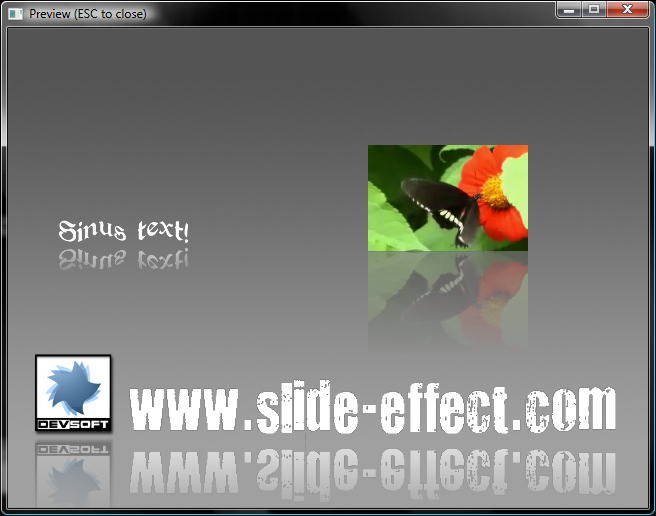
I am glad to present to you the first new feature of the upcomming 1.1.0 version: reflection!

Reflection example in slide effect preview window

Reflection is available for images, standard texts and even movies!

There is now a new flag just on the bottom of the shadow flag in the properties window, check it, and you have automatic reflection on your objects.

Reflection property

Reflection is fully implemented and tested and I’m starting to work on some exporters for Slide Effect.

New version 1.0.1 is released.

As announced, it is a bug fix release with no new features.

Here follows the list of fixes:

  • Media list in .sef file: Fixed a bug when re-opening an existing .sef file without changing transition or backgrounds (some medias were not saved in the archive.)
  • Character collision effect: Fixed a small bug on it (text was too spaced at the end of the effect)
  • Delete an object: Fixed a bug when no object was selected and delete button was still enabled.
  • 2D Text: Unsupported characters (like €) does not throw anymore an error, they are simply not displayed.
  • 3D Text: Corrected a scale bug with some start/end effects.
  • GUI Fonts: If a title fonts is not found, it search for another one and does not display an error anymore.
  • Error Dialog: Added Windows version into the bug report.
  • Error Dialog: Dialog is automaticaly closed when bug report is sent.
  • FFMpeg: Replaced GPL FFMpeg by the LGPL version.
  • Error Dialog: Added Windows version into the bug report.
  • File/Exit menu: Confirmation dialog added.

Free trial and full version have been updated.

I’m already working on the next version. It will have new exciting features on it, more information soon.

News icon

Initial users have found small bugs in the first release.

Thanks also to the guys who sent me automatic error reports using the application.

So, I schedule 1.0.1 release to next thursday.

I won’t add new features in this release, I will only do a bug fix release. Please continue to send me feedback and bug reports they are appreciated.

I’m still also collecting ideas for the next features of Slide Effect, I have already a big list of enhancements on my desk but I’m still open to all my customers needs.

News icon

After 6 months of hard work, Devsoft is proud to announce the release of its new multimedia product: Slide Effect.

Slide Effect is a software tool to create presentations or slide-show in a few mouse click with really advanced effects to impress your audience.

It is the best tool to create presentations or slide-shows for weddings, shows or parties.

Please download the trial version to try by yourself the power of Slide Effect!

Try free version!