News

Version 1.4.1 of Slide Effect has been released. This is mainly a bug fix release to correct several nasty bugs introduced with 1.4.0.

It corrects a bug that cause a crash at startup of Slide Effect on some Windows localizations (due to the use of the coma instead of the dot for the decimal separator).

It also enhances a bit the overall speed of the user interface and add a new background option to the Clouds background mode.

Trial and full version have been updated and available for all registered customers.

We are really happy to announce the immediate release of Slide Effect Presentation Creator 1.4.0.

This version is the most important upgrade of Slide Effect since the beginning, and, as usual, this upgrade is free for all existing customers!

Here follows the (long) list of major new features and enhancements:

Multi-line text areas
You can now write a full multi line text in one single text object. You can also set the alignment (left,right and center) of it.
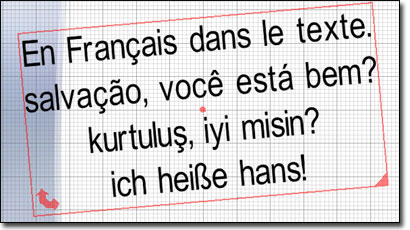
Multi line, multi charset support.
Multi line text in multiple language!

Extended charset support
Slide Effect is now able to use and display an extended charset. What does it mean? You are not anymore limited to standard English , but you can write text in French, Spanish, Portuguese, German or Turkish!

The bad news is that we do not support yet completely different charsets like Russian or Chinese.

Backgrounds Categories and templates

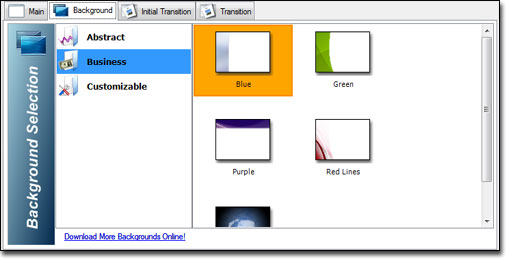
New Background selection interface

You will now found several categories of backgrounds. The idea is to provide customizable backgrounds as usual (located on “Customizable” category, and predefined ready to use backgrounds in several categories (Actually: “Abstract” and “Business”). We will provide additional optional background packages on our website that you will be able to download. These additional backgrounds will be grouped by subject (Business, Halloween, Wedding, Christmas, …)
New advanced particle mode
Create advanced particles effects.

A new “Advanced Particles” customizable background is available too.

Exportation

Export your presentations
Export now as all-in-one file executable.

A new Standalone executable export option is available on the exportation dialog. Using this option, you will be able to create standalone executables without any installer.

Objects Rotation
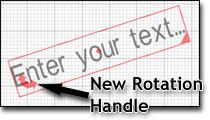
You can now rotate your pictures and texts!
Rotate easily all your items.

All the objects you can put on a slide (texts, images, …) can be rotated using the bottom-left corner.

Drag and drop and copy/paste
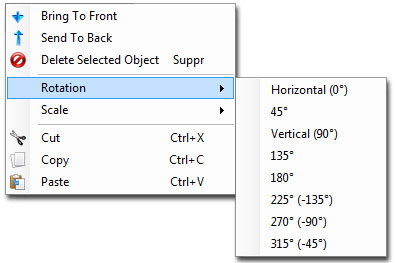
Drag and drop your files directly in Slide Effect
The new contextual menu where you can set rotation, size and copy paste objects.

Drag and drop and copy paste is now fully implemented. Drag your movies or your images directly from your favorite paint package, copy a text, or directly import a chart you have made using Excel in one click! (well, maybe two)

You can do it using the keyboard, the mouse or using the contextual menu on the main tab.

Another nice new feature is the slide duplication: Just right click on the slide thumbnail and you will be able to duplicate it!

Image border
You can now add a black or white image border to your pictures to make it looks like a paper photo.
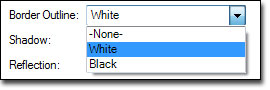
Add a border to your pictures
The new option available for pictures.
A nice photo border effect for this picture
A white paper photo effect.

Editor
The main preview tab now displays a preview of the background used. This way it is easier to move the text and others items directly in the correct place without previewing it.

Non standard DPI supported
Users who have a custom DPI for the size of the windows (also known as “Large Font”) will now be able to have a clean and standard user interface.

Bug Fixes
A lot of miscellaneous bugs have been fixed, take a look at the release note for full details.

Check it by yourself!

Trial version available here for download:
https://www.slide-effect.com/trial/SlideEffectTrial.exe

Full version available for all customers using your registered account.

Version 1.3.5 of Slide Effect has been released.

It is basically a minor bug fix version, because we introduced a regression bug in the last version when you use Slide Effect on directories with “special characters”, like ï or ã.

Here follows the main changes:

  • Bug Fix: Corrected a bug introduced on 1.3.4 (with Unicode support): some users were not able to put an image on a slide. It is now fixed.
  • Resize: Improved resize of items on the slide.
  • Resize: It is not possible anymore to resize an item to a size below zero.
  • Player: If the current screen resolution is bigger than 2048×1536, it does not throw an error anymore.

Trial and full version have been updated.

Version 1.3.4 of Slide Effect has been released.

Here follows the main changes:

  • Movie Export: Added a new “Custom” mode for Flash movie export where you can fine-tune each parameters.
  • new flv movie export wizard
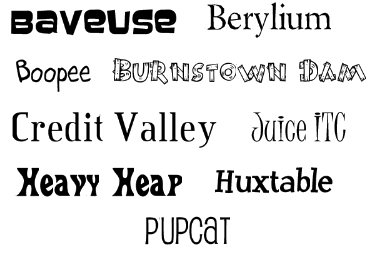
  • 2D Fonts: Added 9 new 2D fonts (Full Version Only).
  • new fonts
  • Start/End Effects: Added a new “from left/right/top/bottom” mode with a basic light easing in/out.
  • Pictures And Movies: Now supports Unicode filename(such as Russian, Chinese, Arabic…).

Check the release notes for a full listing of all the changes.

Trial and full version have been updated.

Version 1.3.3 of Slide Effect has been released.

Here follows the main changes:

  • Fullscreen Display: Fixed graphical glitches when using Blur and Glow transitions on non 4/3 display modes.
  • Movie Export: Added a new “High Quality” mode for Flash movie export.
  • Movie Export: Corrected a bug with DVD Pal export: the movie was a bit too fast.
  • Screensaver/Executable/Movie Export: Does not throw anymore an error when trying to export a presentation with blank pictures or movies.

Trial and full version have been updated.

This is the end of the year, time to think about the future and take a look to the past.

To know better which features of Slide Effect we have to improve and which are the next features we will add, we ask YOU to answer a very small survey about you, our website and our software.

Your input is really important for us, so please, please, please, take some minutes to answer this short survey.

Slide Effect Survey 2008

[Click here to go to the survey!]

Thanks very much in advance!

We wish you a Merry Christmas and a Happy New Year 2009!

Version 1.3.2 of Slide Effect has been released.

Here follows the changes:

  • Movie Export: Rewrited the way we save the sound of a movie to be more robust.
  • Object Order: Rewrited the way objects are placed on the screen (z order).
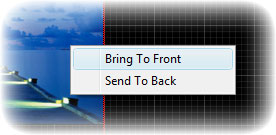
  • Object Contextual Menu: Now when you right click on a picture, a movie or a standard text, a contextual menu appears with the following options: “Bring To Front” and “Send To Back”.
contextual menu screenshot

Trial and full version have been updated.

Version 1.3.1 of Slide Effect has been released.

It is only a bug fix release: no new features have been added.

Bugs fixed:

  • End Effect: Corrected an issue with pictures and some other objects: the end effect was not displayed after the first loop when the presentation was in loop mode.
  • Corrected error “Could not find a part of the path …”: When saving a presentation with some blank objects, the saved file was corrupted and this error was displayed. It now works correctly.
  • Add a slide: Fixed a small bug when adding a slide on a presentation (index out of bound error).

Trial and full version have been updated.

I added a new section in the site about tutorials.

You can already find two useful tutorials:

More will be added.

Version 1.3.0 of Slide Effect has been released.

Here follows the main changes and new features:

Export to movie: New option to export to movie (web format and DVD (PAL/NTSC) format.
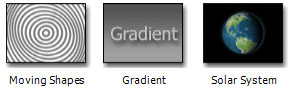
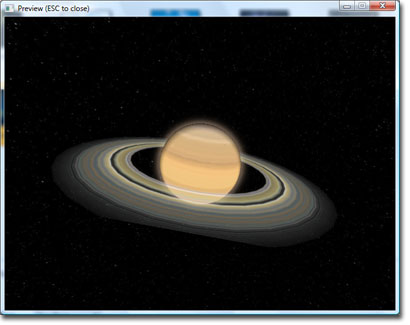
Backgrounds: 3 new backgrounds (Gradient, Moving Shapes and Solar System).

New backgrounds!

Solar System Planet Backgrounds!

Windows Vista Compatibility: Use correct Windows temporary directory to enhance Vista compatibility.
Lighting: Lighting in general has been reworked.

Trial and full version have been updated.