News

We released today the version 1.7.0 of Slide Effect (Professional and Standard Editions).

Here follows a quick list of the main changes in this version.

User interface changes
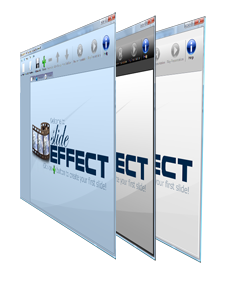
Slide Effect now supports multiple skins The user interface of Slide Effect has been completely reworked and is now available in 3 different themes (plus the old look for nostalgic people). Use Tools/Options menu to choose your preferred color scheme.
The interface is also available now in 4 languages: English, French, Italian and Spanish.. Don’t hesitate to contact us if you need another language and if you have some free time, we will be happy to provide you the tools to translate the interface into your language.
The correct idiom should be automatically set, but if you want to set it manually, just go to Tools/Options and switch the language combo box from Automatic to the language you want to use.

New effects for images, 3D texts and 3D cubes

We redesigned many existing effects and we added a lot of new Start/End and Animation effects for images, movies, 3D texts and 3D cubes.


New functionalities of Slide Effect

Images and movies can now be displayed and animated using a lot of new amazing effects.

3D texts now supports upper and lower cases as well as specific languages characters. We added also a choice of 20 materials to change the apparency of the letters.

3D texts and 3D cubes can now be completely positioned along the 3 axis (XYZ). This way you will be able to create fully stunning 3D effects.

Final word

Many other small enhancements have been added (Danish characters support, fullscreen preview, outline for movies, …). Check the “history” page of the bundled help for a complete list.

We really hope you will appreciate these new enhancements to Slide Effect. Don’t hesitate to send us feedback if you have feature ideas or any suggestion.

Trial, Standard and Pro editions have been updated and are available for all registered customers (using “Product Updates” page). Existing users who want to upgrade to the Professional edition can check the upgrade page.
We are happy to announce we just released the version 1.6.0 of Slide Effect Presentation Creator.

The biggest news of this new version is the availability of the awaited Professional Edition! But this version adds a lot of new features to the standard edition too. Here follows the details of the new version:

Professional Edition and Standard Edition

Professional Edition Slide Effect is now available in two different editions. The standard edition is the existing Slide Effect, and professional edition is dedicated to users who wants more!

The two main exclusive features of the Professional edition are:

  • Read and write Powerpoint™ files: using the Professional edition, you will be able to import and export Powerpoint files (ppt & pptx) to Slide Effect.
  • Use your own fonts: the Professional edition comes with a font importer tool. This way you will be able to use your preferred fonts on your presentations.

Check the upgrade page if you want to know more about this Professional edition, you may also compare the features of each editions.

Wide Screen Format

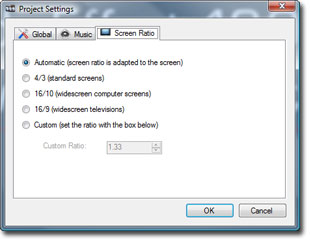
Widescreen format settings Presentations can now be created in wide screen format. By default the presentation will automatically adapt to the screen format you are using, but you can also choose explicitly either 4/3, 16/9, 16/10 or even a custom ratio using the project settings.

This way, presentations will run completely fullscreen on each and every available screens and devices.

Note: Old presentations will be set to old standard 4/3 by default.

New Text Effects

Text effects have been reworked: 8 new start/end effects and 6 new animation effects have been added. Check it on the following movie:

Unlimited Undo and Redo

Widescreen format settings Undo(s) and Redo is now available in the interface. Shortcuts are standard (Ctrl-Z and Ctrl-Y).

Redo is limited to one level, but you can Undo as many steps as you want.

Final Word

As usual, trial and full version have been updated and are available for all registered customers (using “Product Updates” page). Existing users who want to upgrade to the Professional edition can check the upgrade page.

We are already working on features for the next (Standard and Professional) version : Thanks to all our customers for their trust and their support: 2010 will be a great year for Slide Effect.

We have released a new background package for Slide Effect Presentation Creator: MotionKit Background Package.

This package is available for FREE for every users of Slide Effect Full Version. It contains not less than 25 new background effects.

MotionKit.com logo

Thanks to MotionKit.com – Fresh HD Stock Footage & Motion Graphics for this package. Don’t hesitate to check their website if you are looking for professional and spectacular background movies.

Well, this is the end of the year, a very important and particular year for Slide Effect.

Let’s rollback to august 2007, when I was working to create a wedding presentation for a friend using a Microsoft product to create a musically synchronized slideshow… This evening (mmmh, night), after hours trying to create something cool and unusual, an idea comes into my mind… It would be cool to have a program like this Microsoft tool (no, I won’t say the name 🙂 ), but focused on neat effects and transitions instead of old, sluggish, already 10’000 times seen effects, where you can easily synchronize things to the music: Slide Effect was born in my mind.

It took me more than 6 months to create the first version, to create a website and to learn a bit how to sell a software over the internet, then on April 2008, I opened the website.

After 2 looonnng weeks, I made my first sale, then, another one, and so on… I was not the only one to think that kind of software would be cool!

Then, during the following year, I took time to listen to my customers and I enhanced Slide Effect on almost every aspects. This was a very interesting and exciting period for me: It was very interesting to talk to customers about what is cool actually on my software and what would be cooler. Thanks again for the feedback.

Obviously, I did all of this on my spare time. That was not easy: when your work is finished, you take care of your family, then you do something for your house, and, maybe, if you have the stamina, you work on Slide Effect…

So (roll the drums!), I took the decision to go full time on Slide Effect since beginning of 2010! (on 1st of March to be exact)

This is a very risky decision, as I don’t have enough sales yet to feed my family, but I want to try to be able to live from Slide Effect by the end of 2010. This is what I want to do since a long time, and I have the feeling that I won’t be able to achieve this goal only by working a few hours a day.

So the good news for you is that I have a lot of ideas and Slide Effect will gain a lot more new features next year.

In the pipeline, for the beginning of the year, I will probably create a “Pro” edition of Slide Effect with Powerpoint import/export (oups, I said the name) and the ability to use your own custom fonts. Then I will try to create a lot more background packages, and then I will continue to tick features on my 10 kilometers todo list.

(And, as always, I am widely open to each and every suggestions)

Well, stop talking about me: it is time for party!

I wish you a very happy and exciting new year 2010 and a merry Christmas! That will be an exciting year for me and Slide Effect!

After more than one year of service the old website is gone! The first version of the website was done in a bit of a hurry at the release of Slide Effect. So, these last weeks, I took the time to give Slide Effect the website it deserves.

I hope you appreciate this new website.

The look, obviously, has changed. But we changed also the overall organization of the whole content to be more intuitive.

This is just the beginning, we have a lot of ideas for this new website.

If you have any feedback or issues with this new website, feel free to mail me a comment at alain@slide-effect.com.

Version 1.5.1 of Slide Effect has been released. It is a small bug fix minor update.

Release Notes:

  • Solar System Background: Lens Flare that was not visible on 1.5.0 are back.
  • 3D Transition: Enhanced Effect, added a new setting to choose the ease of the transition.
  • Tunnel Background: Corrected a bug when running two tunnel backgrounds on the same presentation.

Trial and full version have been updated and are available for all registered customers.

We have released a new background package for Slide Effect Presentation Creator: Looped Movies Background package.

This package is available for FREE for every users of Slide Effect Full Version.

Here follows a quick movie to preview the new backgrounds of this package:

Version 1.5.0 of Slide Effect has been released. So what’s hot on this new release?

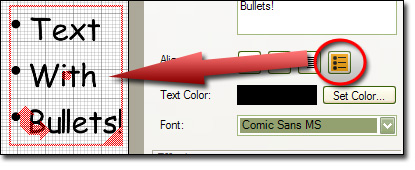
  • Bullets: you can now add text with bullets to create really professional presentations.
  • Bullets Texts
  • Movies: Everything regarding movies have been reworked from import to export. The quality of the movie rendering is now much, much better.
  • Movies: You can now loop movies.
  • Movies: Quicktime (*.mov) movies are now allowed for import.
  • Effects: Player have been reworked to provide more seamless transition effects.
  • New Options: New “Press Key to start” option, and new setting to choose movie import quality (bitrate).
  • New Background Effect: A new “Looped Movies” background effect has been added.
  • Looped Movies
  • Bugs Fixes: A whole bunch of bugs have been fixed.

Trial and full version have been updated and are available for all registered customers.

Have fun!

We have released a new background package for Slide Effect Presentation Creator: Crystal Icons Background package.

This package is available for FREE for every users of Slide Effect Full Version.

Here follows a quick movie to preview the new backgrounds of this package:

We have released our first additional background package for Slide Effect Presentation Creator: Halloween Background package.

This package is available for FREE for every users of Slide Effect Full Version.

Here follows a quick movie to preview the new backgrounds of this package: