News

We released today the version 1.8.0 of Slide Effect Presentation Software (Professional and Standard Editions).

This version add a lot of long awaited features! Quick presentation:

Audio: add several audio files.
Add several audio files to your presentation!

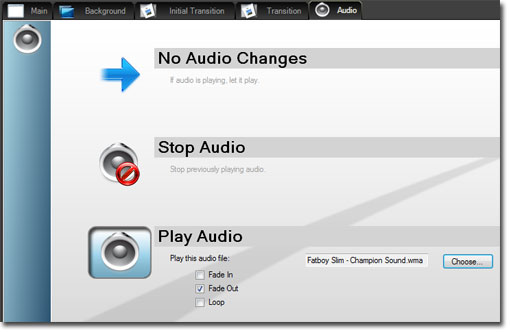
It is now possible to use several audio files into your presentation. A new Audio tab has been added to the user interface, and now you can choose, for every slides, which audio file you want to play.

You can also fade in or/and fade out each audio files.

Movie Export: bigger, better, faster!

The movie exportation wizard has been also completely reworked. Movie export is now considerably faster, you can export in much more formats (like HD-1080, xVid or even Lossless raw video output) and you will be able to change all the output settings to create the exact movie file you want.

Print your slides! (and don’t save a tree)
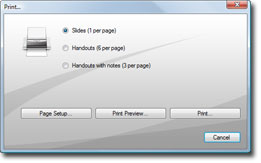
Print your slides in several formats.

You can now print the slides of the presentation in several popular formats (slides, handouts or handouts with notes).

Multiple image importer
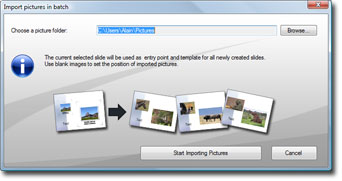
Import a batch of pictures in one click.

Do you have a directory full of pictures and you want to create a presentation with it? With the batch image importer, create your slide-show in one click.

Just create the template slide and select the source pictures directory, Slide Effect will create all the slides for you.

Talk Over Mode [Professional Edition]
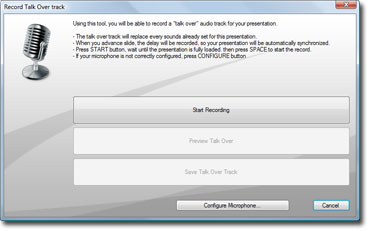
Talk over mode: record your voice directly on Slide Effect.

Using the Professional Edition, it is now possible to record your voice and synchronize the whole presentation with it.

Music Synchronization wizard [Professional Edition]
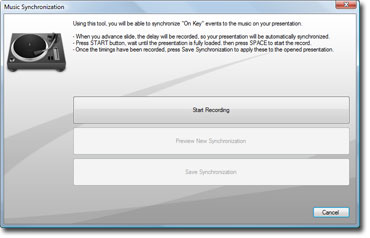
Music Synchronization.

Using the Professional Edition, it is now easier to fully synchronize images and music with the new music synchronization wizard.

Miscellaneous

Other than these new big features, there are a few new things that worth a look:

  • Dutch Translation: Dutch Translation added. (Thanks to Bertus Roerade!)
  • Wipe Transition: Added ease parameter.
  • 2D Texts: Added “Rolling Credits” Animation Effect.
  • 2D Texts: Added “Star Wars” Animation Effect.
  • Program Options: New option to display the presentation on the secondary screen.

Trial, Standard and Pro editions have been updated and are available for all registered customers (using “Product Updates” page). Existing users who want to upgrade to the Professional edition can check the upgrade page.

Oh, I forgot…

Merry Christmas!

Let’s take the opportunity of this new release (let’s call it “Christmas Release”!) to wish you a Merry Christmas and a Happy New Year 2011.

2010 has been a crucial year for our business, as I started to work full time on it on march 2010. Until now I don’t regret this decision: it was one of the smartest decision I ever made in my entire professional life.

There is, still, a long way to go to make Slide Effect as successful as it deserve, but the sales and the feedback of users are on a positive trend, so thank to all my customers for your trust and your confidence (and your patience with some nasty bugs, too!)

Happy New Year everybody: 2011 will be a great year for Slide Effect!

BEX, SWITZERLAND – October 27, 2010 – Devsoft, developer of multimedia products, including the award winning Slide Effect Presentation Software, today announced the immediate release of Banner Effect: a Windows software to create Flash banners with just a few mouse clicks.

Banner Effect is a desktop software aimed to banners creators, designers or webmaster in need of a visual tool to create small Flash animations and banners. You won’t need to understand Flash or ActionScript to create a banner: choose the format, create your slides, add some text and images on it and, finally, add some effects and transitions to make your banner impressive.

Banner Effect: Flash Banners Made Simple.
click to enlarge

Once your banner is ready, compress it to the size needed and simply save it on your website. Banner Effect also provides a special Google Adwords mode to create banners usable as Google Ads.

Banner effect is available in two editions: a free trial edition and a complete edition for $99.

For more information about Banner Effect, please visit: http://www.banner-effect.com

About Devsoft

Devsoft is an independent Swiss-based software company. Our core business is creating software for working with images, realtime 3D, music or video… In one word, multimedia.

Our products include:

  • Banner Effect: A flash banner creator to create banners in a few clicks.
  • Slide Effect: A presentation software tool to create impressive presentations.

If you want to know more about our company, please visit http://www.devsoft.ch company site (French-speaking).

We released today the version 1.7.5 of Slide Effect Presentation Software (Professional and Standard Editions).

It is a maintenance release with just a few small bug fixes.

In details:

  • Save project: Display in a more user friendly an error if the target directory is not writable by the current user.
  • 3D Texts: Corrected an issue when displaying 3D texts with spaces and start/end particles effect.
  • 3D Texts: Corrected an issue when displaying empty 3D texts.

Trial, Standard and Pro editions have been updated and are available for all registered customers (using “Product Updates” page). Existing users who want to upgrade to the Professional edition can check the upgrade page.

We released today the version 1.7.4 of Slide Effect Presentation Software (Professional and Standard Editions).

It is a maintenance release with just a few bug fixes. It fixes a big problem on 1.7.3 regarding transitions, so every user of 1.7.3 should update as soon as possible.

In details:

  • 3D Texts: Corrected an issue when displaying 3D texts with spaces and start/end effect “Letter by letter”.
  • Transitions: Due to a debug code released by error on 1.7.3, transitions were messed up on save. It is fixed, but you will have to set once again transitions on these presentations.
  • Main Tab contextual menus: Copy/Cut/Paste menu items are now correctly displayed when clicking on 3D texts and 3D cubes.
  • Copy/Paste objects: Cleaned up copy/paste objects: works better now.
  • Click Order: Corrected a problem when duplicating objects with click orders in it.

Trial, Standard and Pro editions have been updated and are available for all registered customers (using “Product Updates” page). Existing users who want to upgrade to the Professional edition can check the upgrade page.

We released today the version 1.7.3 of Slide Effect Presentation Software (Professional and Standard Editions).

It is a maintenance release, but contains some nice enhancements. In details:

Object Apparition on click!

Texts, images or any other objects can appear on click!
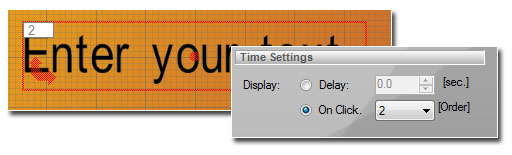
It is now possible to choose between a delay and a click for displaying objects. You can change the order of apparition using the “Order” combo box.
On the main tab, you will see the order number on the top left of each “On Click” objects.

3D Cube face switch on click!

3D cube can now switch faces on click!
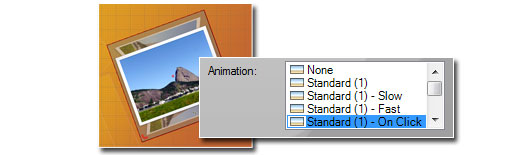
It is now possible to switch faces of the 3D cube on user click. Just choose one of the three following “Animation Effects”:

  • Standard (1) – On Click
  • Standard (2) – On Click
  • Standard (3) – On Click

Bug fixes

Other than these new features, there are a few bug fixes in this new version. Here follows the details:

  • Translations: Some texts were displayed in English even when the interface was in another language: it is fixed.
  • Water effect: Reduced a little bit the wave speed and amplitude.
  • Advanced Particles Effect: Changed display of “Random Speeds” with 3 decimals.
  • Image handling: Changed the way we handle image internally to avoid errors of type “The process cannot access the file XXX because it is being used by another process.”.
  • Transitions: Changed some details to make some transitions smoother (there was 1 pixel offsets on several).
  • New Click Object Display Mode: Objects can now appear after a delay or depending on user click
  • “Gang of three” font: Removed a problem that could lead to a “memory access violation” problem.
  • Movie Importation: *.mpg, *.mpeg and *.mp4 are now accepted.
  • Bug Report: Re-added user email in sent report.
  • Powerpoint Import: Corrected a bug when importing from powerpoint: some transitions were not correctly created.
  • Export to movie: Sometimes end of sound was cropped, it is now fixed.
  • 3D Cube: 3 new animation effects where you can change side on mouse click.
  • 3D Cube: Image size and aspect is handled in a better way.

Trial, Standard and Pro editions have been updated and are available for all registered customers (using “Product Updates” page). Existing users who want to upgrade to the Professional edition can check the upgrade page.

It is a background package week! We just released two new free background packages:

Business Backgrounds Business Presentation Backgrounds to create professional business presentations.
Grunge Backgrounds Grunge Presentation Backgrounds to create dirty and rusty original presentations.

These packages are available for free on Add-Ons page for every users of Slide Effect Standard and Professional edition.

We just released two new presentation background packages:

Wedding Backgrounds Wedding Presentation Backgrounds to create nice presentations for this unique day (I hope so) in your life.

Christmas Backgrounds Christmas Presentation Backgrounds to create Christmas presentations and slideshows (Yeah, I know we are in July… but it was refreshing to work on snow flakes and Christmas trees as I don’t have air conditioning in my office).

These packages are available for free for every users of Slide Effect Standard and Professional edition.

Presentation Gallery of presentations made with Slide Effect Presentation Software

We announce the opening of PresentationGallery.net a website dedicated to be a showroom for the presentations made with Slide Effect Presentation Software.

On this new website, you will find an ever growing choice of presentations classified into several categories (Business, Musical, Leisure, …).

You can watch each presentation directly on the site or download the standalone package (.exe) and even download the project file (.sef) if you want to use it as a basis for your next slide show.

Obviously, you can submit your own presentation using the dedicated page. This process is actually not yet fully automatized, so a delay can occur between the submission and the online availability.

Feel free to send me any feedback on this website.

We released today the version 1.7.2 of Slide Effect Presentation Software (Professional and Standard Editions).

It is a maintenance release with just a few bug fixes.

In details:

  • Movies: Corrected an issue when playing a video with no transition and a small delay: sometimes they were not playing. It is now fixed.
  • Images: When opening very old presentations made with Slide Effect 1.4.2 and older, sometimes image were not displayed. It is fixed.
  • Bug Report: Re-added user comment in sent report.
  • Texts: Fixed a problem when using background particles effects in the same time as text particles effects.

Trial, Standard and Pro editions have been updated and are available for all registered customers (using “Product Updates” page). Existing users who want to upgrade to the Professional edition can check the upgrade page.

We released today the version 1.7.1 of Slide Effect (Professional and Standard Editions).

It is a maintenance release with just a few bug fixes and a new mechanism to recover from corrupted project files.

In details:

  • Solar System Background: Corrected a small issue with the lens flare on some transitions.
  • 3D Texts and 3D cubes: Corrected a small graphical glitch when exporting as a movie with some transitions.
  • File Saving: A .bak file is now created with the previous version of the project file.
  • File Saving: If an error occurs during save, the file is not anymore corrupted, but not saved.
  • File Loading: If the file is corrupted, a popup asks if user want to restore a backup.
  • File Loading: Project is not flagged as modified anymore when you load it and only view the different slides.
  • Bug Report: Added new information (dump of file, dump of tmp dir).

Trial, Standard and Pro editions have been updated and are available for all registered customers (using “Product Updates” page). Existing users who want to upgrade to the Professional edition can check the upgrade page.